The only lifting app
worth using.
I've tried a lot of fitness apps. Lyfta is the one that changed how I program, track, and think about progressive overload. Here's my honest take — and how to get it at 30% off.

Exclusive Discount Code
30% off premium · Monthly & Annual · No expiration
Affiliate disclosure: I earn a small commission if you purchase through my link — at no extra cost to you. I only recommend apps I personally use.
Follow Me on Lyfta
Bryant Wimmer
See my workouts, follow my progress, and get motivated by what's happening in the gym.
Follow on Lyfta →Honest Review
Why I chose Lyfta — and why I'm sticking with it.
I've been using Lyfta for about five weeks. I'm not going to pretend I've unlocked
everything — but what I've found so far has already changed how I program and track
my training. And I'm still finding new features.
What sold me was the exercise library. Not just the size of it — the video demos for every single movement. You can browse by muscle group, by equipment, or by movement pattern. When I was setting up my routine, I could find exactly the variation I wanted in seconds.
My current split is Back/Biceps, Chest/Triceps, and Legs/Shoulders — each twice per week. I also work core on Back/Bicep days. Once I built those workouts, I just hit "Perform Again" and I'm going. That's it. No setup, no guesswork, just training.
Try Lyfta Free →Massive Exercise Library
Thousands of exercises with video demonstrations. Browse by muscle group, equipment, or movement pattern — find exactly what you need instantly.
"Perform Again" Workflow
Once your routine is built, just tap "Perform Again" on your last session. Your program is ready to go — weights, sets, reps, all pre-loaded.
Volume Tracking
Lyfta tracks your total training volume automatically. If volume goes up week over week, you're applying progressive overload. The data doesn't lie.
Social & Accountability
Follow friends, family, and clients. See their completed workouts. Leave a thumbs up or comment. Simple, effective accountability built right in.
Custom Programs
Build your own program from scratch or choose from dozens of coach-designed programs. Your routine, your structure, your goals.
Fitness Tracker Integration
Connects to Apple Watch, Galaxy Watch, and most major fitness trackers for automatic workout logging and real-time heart rate data.
Progressive Overload in Practice
Volume tracking is how you know it's working.
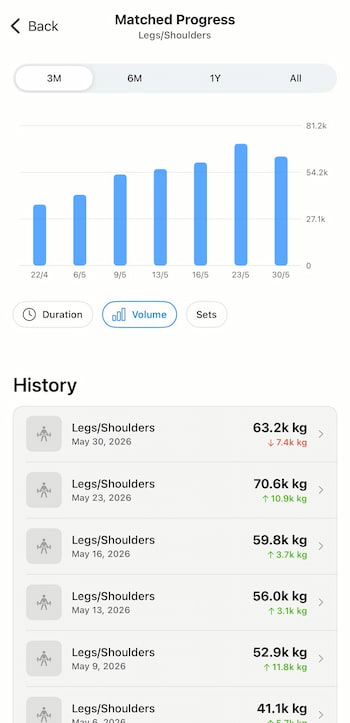 Progressive overload is the engine behind every result you'll ever get from lifting.
But you can't apply it without data — and most people have no idea if they're actually
progressing because they're not tracking.
Progressive overload is the engine behind every result you'll ever get from lifting.
But you can't apply it without data — and most people have no idea if they're actually
progressing because they're not tracking.
Lyfta tracks your total volume automatically — sets × reps × weight for every exercise in every session. Keep the same routine and watch the volume number go up week over week. That's progressive overload happening in real time. The app makes it visible.
This is exactly why I recommend Lyfta specifically for anyone serious about making progress — not just showing up, but actually moving forward.
Read: What Is Progressive Overload →"If you're not tracking your workouts, you're guessing. And guessing doesn't produce results."
— Bryant Wimmer
Chest & Triceps Day
Lyfta demo vs. real life — side by side.
These are five exercises from my Chest/Triceps day. On the left — the Lyfta in-app animation. On the right — me performing the actual lift. This is how I use Lyfta to build and reference my program.
Alternate Tricep Extension
TricepsCoach video coming soon
Keep your elbow locked in place and focus on full extension at the bottom. Alternating allows better mind-muscle connection per arm.
Chest Fly
ChestCoach video coming soon
Slight bend in the elbows throughout. Think about hugging a barrel — not pressing. The stretch at the bottom is where the chest work happens.
Tricep Dip
TricepsCoach video coming soon
Keep your torso upright to keep the focus on triceps. If you lean forward, you shift the work to chest. Control the descent.
Tricep Pushdown
TricepsCoach video coming soon
Elbows stay pinned to your sides the entire rep. Full extension at the bottom, controlled return to the top. Don't let your elbows flare.
Tricep Side Pushdown
TricepsCoach video coming soon
Single arm isolation. Great for identifying and correcting strength imbalances between arms. Squeeze at the bottom of every rep.
See It In Action
From zero to training in under 60 seconds.
This is me opening Lyfta and starting my Chest/Triceps workout. No setup, no guesswork — just find the workout, hit "Perform Again," and go.
Workout walkthrough video coming soon
Bryant opening the app and starting a session
Getting Started
First four things to do after you download.
Create Your Account
Download Lyfta from the App Store or Google Play. Create your account and set up your profile. Use my link below to get 30% off premium.
Set Your Default Rest Time
Go to Settings → Workout Settings → Default Rest Time. I set mine to 1 minute. This auto-starts a rest timer after every set so you never guess how long you've rested.
Set First Day of Week
In Workout Settings, set your First Day of Week to match how you think about your training week. Default is Sunday — change it if your week starts Monday.
Connect Your Fitness Tracker
Lyfta connects with Apple Watch, Galaxy Watch, and most major fitness trackers. Connect yours in Settings for automatic workout logging and heart rate data.
Exclusive Discount
Get Lyfta premium.
30% off. No expiration.
Use code WIMMER30 at checkout. Works on monthly and annual plans. Download free, upgrade when you're ready.
Affiliate link — I earn a small commission at no extra cost to you.